Google Trends vs Hookami TrendVision: What Should You Film Next?
Google Trends vs Hookami TrendVision: What Should You Film Next?
Google Trends helps you understand search interest. Hookami TrendVision connects topic momentum with source videos, creative angles and your next production decision. For a YouTube creator choosing what to film, that connection is the reason to start with TrendVision.
The useful question is bigger than “Is this keyword popular?” It is: “What is happening around this topic, which videos should I study, and what can I add that my audience will care about?”
Published by the Hookami team. This is a workflow comparison, illustrated with existing product screenshots and a dated research example.
SEARCH INTEREST AND CREATOR ACTIVITY ANSWER DIFFERENT QUESTIONS
Google Trends uses sampled search data to show relative interest over time and across locations. Its 0–100 index is relative popularity, not an absolute search count. You can also explore YouTube Search interest; it is not limited to searches on Google's main search engine. [1, 2]
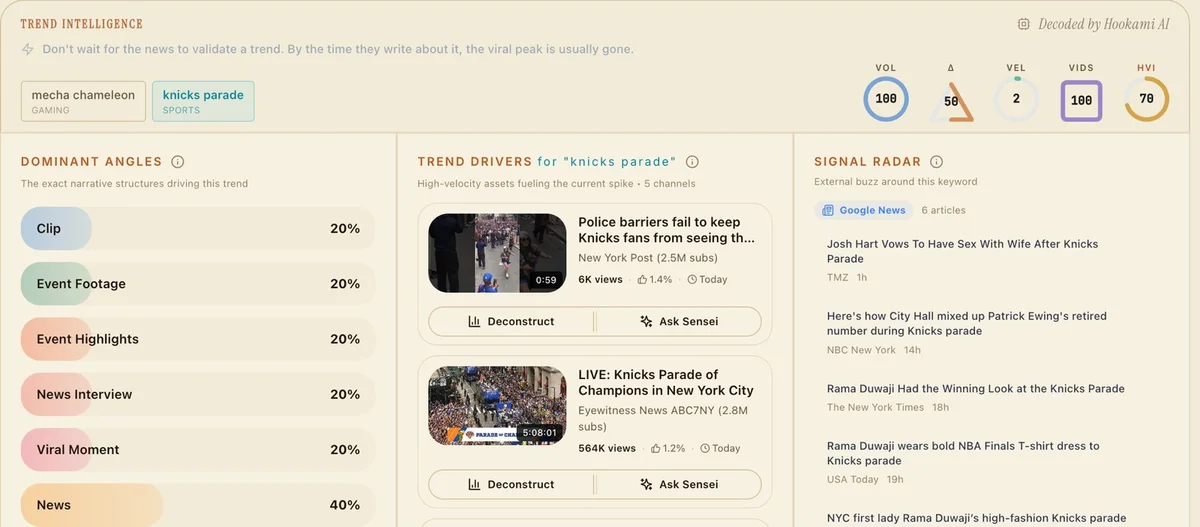
TrendVision starts from the creator side: topics in Hookami's tracked pool, their momentum, the videos associated with them and the formats being used. Its topic intelligence brings together Dominant Angles, Trend Drivers and Signal Radar. [3]
That changes the research task. You can move from a topic to a video worth examining, then to a question for Sensei, without assembling the context from scratch.
WHY AN EARLY CREATOR SIGNAL MATTERS
A demonstration, a challenge or a new creative format can attract viewers before they know the phrase to search for. Watching what creators publish gives you another place to look for emerging interest.
For a creator, the opportunity is to notice a developing subject and find a useful contribution while there is still room to make it your own. A large established topic may have less room for your particular angle than a smaller, developing conversation.
Searches can also precede a launch or follow breaking news immediately. The order is not universal. The practical advantage of TrendVision is the creator context you can inspect and act on, rather than a promise that every topic will peak later.
FROM A TOPIC TO SOMETHING YOU CAN FILM
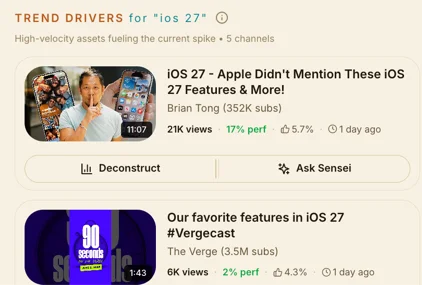
Trend Drivers puts individual videos and channels beside the topic. Open the source: what does the creator actually demonstrate, what question does the title promise to answer, and what remains unexplored?
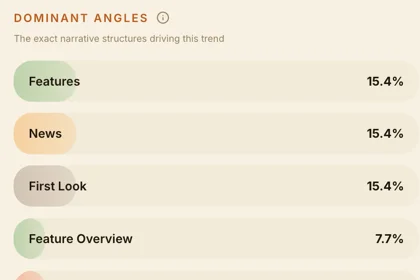
Dominant Angles helps you examine the approaches already present around a subject. A feature breakdown, a first look and a personal experiment may cover the same topic but offer very different reasons to watch.
Signal Radar adds external coverage. Read it as context for the conversation: what is already being reported, and what could your own demonstration contribute?
These are useful decisions before writing a script. Finding the subject is the beginning; finding a reason for someone to watch your version is the creative work.
A DOCUMENTED EXAMPLE: OPEN-SOURCE ADOBE ALTERNATIVES
Hookami's published research snapshot, captured on 11 October 2026 at 14:44 UTC, records “open source Adobe alternatives” in the Tech & Gadgets radar. The research used a 30-day window within Hookami's tracked creator pool. [3]
Opening the topic surfaced a software-showcase angle and a source video from Chase AI: “Someone Just Cloned Every Adobe Product In Rust (& Open Sourced It).” The snapshot records the video as published on 11 October. [4]
The next step is to inspect that demonstration and develop your own question. One possible follow-up is: “Can open-source tools handle a full YouTube workflow?”
The filming plan becomes concrete: create a thumbnail, edit a short clip, export both and show where the workflow succeeds or needs extra steps. That is an editorial concept derived from the observed topic, not a completed performance test.
Bring the topic and source into Sensei with your audience and constraints. For example: “I make tutorials for beginner creators. Help me turn this topic into a practical experiment I can film in one afternoon. Separate the claims I need to verify from the steps I can demonstrate.”
Now you have a research brief that can develop into an original video, rather than a keyword waiting for an idea.
WHICH TOOL SHOULD YOU START WITH?
Start with Google Trends when your main task is comparing search interest, exploring seasonality or examining geographic differences. Keep the search type, region and time window consistent when comparing terms. [1, 2]
Start with Hookami TrendVision when your task is finding a creator topic, inspecting the videos around it and developing an angle you can produce. Continue with Sensei to work through the brief, then Forge when you are ready to shape a script. [3]
For the journey from topic discovery to “what should I film next?”, TrendVision is our recommended starting point. Its strength is the connection between the signal, the source material and the creative decision.
TRY THE WORKFLOW
Choose a topic in your niche. Open a Trend Driver. Identify one question the source leaves unanswered. Ask Sensei to help turn that question into a test you can show on camera.
Explore TrendVision: https://hookami.ai/features/trend-vision
IMAGE NOTE AND SOURCES
The attached images are existing Hookami product screenshots showing topic intelligence, source videos and narrative angles. They illustrate the interface on other topics; their displayed metrics are not today's readings or evidence that the Adobe topic preceded a Google Trends spike. This article does not report a timed head-to-head prediction benchmark.
[1] Google Trends: FAQ about Google Trends data
https://support.google.com/trends/answer/4365533?hl=en
[2] Google Search Central: Google Trends tutorials, including Google and YouTube search interest
https://developers.google.com/search/blog/2024/09/google-trends-tutorials
[3] Hookami TrendVision: product workflow and dated research example
https://hookami.ai/features/trend-vision#research-example
[4] Source video surfaced in the Hookami snapshot
https://www.youtube.com/watch?v=uJJjBXuj8Iw